Open several reservations from "Planning".
When using app.hotelgest.com, I see that from the planing I cannot open the reservations in several tabs simultaneously; that is, I have to open them one by one.
Previously from the calendar you could open for example, all the reservations of a day in several tabs, you only had to place yourself on the reservations, give the right click and click the second option: Details (new window).
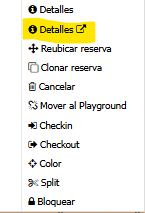
This function we use a lot on a daily basis. We need you to incorporate it in the new platform, otherwise it would affect a lot in the time it takes us to do the reception work.
Thank you very much for everything.
Greetings
Ricardo
Log in to comment and vote
Comments1
Jordi
Dec 14, 2024
Hola. Puedes hacerlo pulsando control en tu teclado mientras le das a la opción de abrir.